Apple MacBook Neo Review: Should You Buy Apple’s Most Affordable MacBook?
Apple's MacBook Neo is the laptop I've been waiting for and one I thought might never show up. With a starting price of $599, it's the most exciting piece of tech I've tested in years, with the potential to be the best MacBook for everyone who doesn't already own one.

Quick Verdict (TL;DR): MacBook Neo Review Summary
Pros
- ✓ Premium aluminum build at a budget price
- ✓ Excellent 13+ hour battery life
- ✓ Great keyboard and best-in-class trackpad
- ✓ Vibrant display with strong resolution
- ✓ Seamless integration with iPhone and iPad
Cons
- ✗ Only two USB-C ports with different speeds
- ✗ No MagSafe charging
- ✗ Limited to 8GB RAM and 256GB base storage
- ✗ No 15-inch size option available
- ✗ Not ideal for heavy video editing or AAA gaming
Who Should Buy MacBook Neo
- • First-time Mac buyers on a budget
- • Students (especially with education discount)
- • Casual users for web, email, streaming
- • iPhone/iPad owners wanting seamless integration
- • Those upgrading from older Intel MacBooks
Who Should Avoid It
- • Professional video editors and content creators
- • Software developers needing multiple VMs
- • Hardcore gamers wanting AAA titles
- • Users who need multiple external displays
- • Those wanting larger 15-inch displays
Apple MacBook Neo Overview: Key Details
Release & Pricing

MacBook Neo Specifications: Technical Details
| Component | Specification |
|---|---|
| Processor | Apple A18 Pro chip (iPhone 16 Pro processor) |
| RAM and Storage | 8GB unified memory, 256GB/512GB SSD |
| Display | 13.6" Liquid Retina, 2408×1506 pixels, 60Hz |
| Battery Life | Up to 15 hours (1080p video), 13h 57min (4K test) |
| Ports and Connectivity | 2× USB-C (USB 2.0 front, USB 3.0 rear), Wi-Fi 6E, Bluetooth 5.3 |
| Weight and Dimensions | 2.7 lbs (1.22 kg), 11.97" × 8.46" × 0.44" |
MacBook Neo Design and Build Quality Review
Aluminum Body and Build
Unlike the sea of plastic budget laptops, the MacBook Neo features the same excellent aluminum unibody construction as Apple's premium notebooks. The chassis feels sturdy and premium, with that signature MacBook indentation in the lid for easy one-handed opening.
Keyboard and Trackpad
The keyboard offers a comfortable typing experience similar to the MacBook Air, with slightly less vertical travel. The real star is the multitouch trackpad—it actually clicks physically (unlike haptic ones on higher-end MacBooks) and supports clicking anywhere on its surface.

Port Selection and Limitations
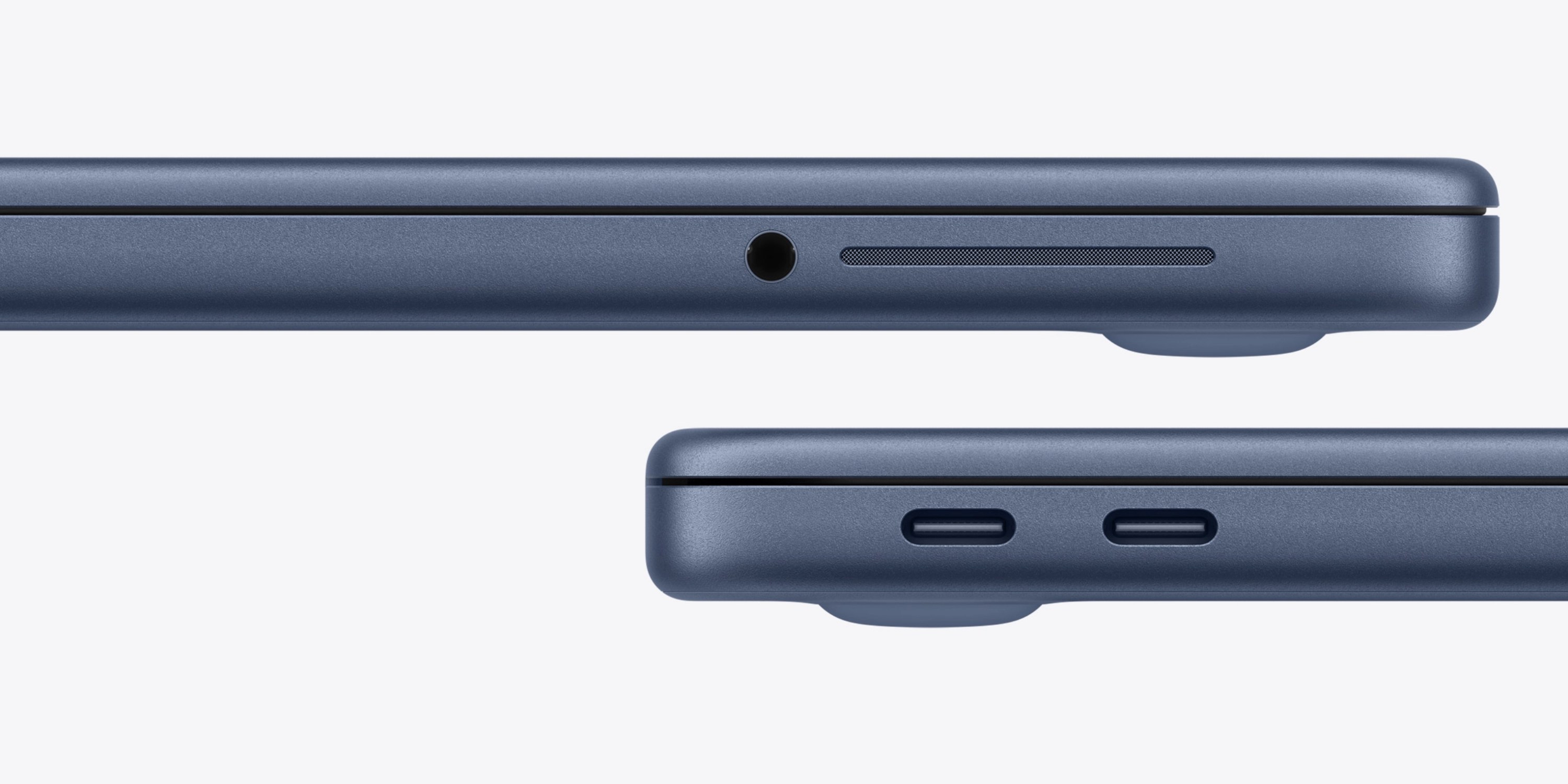
The MacBook Neo has only two USB-C ports with an important distinction: the front port is USB 2.0 (480 Mbps) while the rear is USB 3.0 (5 Gbps). No MagSafe charging means you'll be using one of these ports for power.
Pro Tip:
Plug your charger into the front USB 2.0 port and data accessories (displays, hubs) into the rear USB 3.0 port for optimal performance while charging.
MacBook Neo Display Quality Analysis
Screen Resolution and Quality
The 13.6-inch Liquid Retina display features a 2408×1506 resolution—indistinguishable from the MacBook Air's panel in daily use. Text appears sharp, and images show excellent detail.
Brightness and Color Accuracy
While it doesn't support the P3 wide color gamut like the Air, colors still pop vibrantly. Watching "Top Gun: Maverick" reveals glistening sweat details, and photos show strong detail in challenging scenes.
MacBook Neo vs MacBook Air Display
The Air has slightly better color accuracy and brightness, but for most users, the Neo's display is more than sufficient—especially considering the $400+ price difference.

Display Specifications
- Size:13.6 inches
- Resolution:2408 × 1506 pixels
- Pixel Density:224 PPI
- Refresh Rate:60Hz
- Brightness:500 nits
MacBook Neo Performance Test Results
Everyday Tasks Performance
Powered by the A18 Pro chip (the same processor in iPhone 16 Pro), the Neo handles everyday tasks with ease. A dozen Chrome/Safari tabs remain responsive while jumping between apps like Slack, Messages, and Photos with music playing in the background.
Video Editing Performance
For light 1080p editing in iMovie or Final Cut Pro, the Neo performs adequately. However, editing long 4K timelines or complex projects will show limitations—this is where the MacBook Air or Pro are better choices.
Programming and Development
For web development, Python scripting, or learning to code, the Neo is sufficient. However, running multiple virtual machines or Docker containers will push the 8GB RAM limit.
Gaming Performance on MacBook Neo
Games from the Mac App Store like Resident Evil 2 remake and NBA 2K26 run smoothly. However, AAA titles from Steam like Shadow of the Tomb Raider only managed 13 fps—clearly not a gaming laptop.
Benchmark Comparison
| Laptop | Geekbench 6 Single-Core | Battery Life (4K) |
|---|---|---|
| MacBook Neo | 3,518 | 13h 57min |
| MacBook Air M5 | 4,184 | 16h 38min |
| Best Budget Windows Laptop | 1,839 | 8h 19min |
MacBook Neo Battery Life Test Results
Real-World Battery Results
In our standardized 4K video playback test, the MacBook Neo lasted an impressive 13 hours and 57 minutes. For 1080p content (more relevant for budget laptops), it achieved 15 hours and 10 minutes—destroying the competition.
Charging Speed and Limitations
The included 20W USB-C charger provides only 23% charge in 30 minutes from empty. Compare this to the MacBook Air M5's 47% with MagSafe. No fast charging here, but the excellent battery life minimizes how often you need to charge.
Charging Comparison
- MacBook Neo (20W USB-C) 23% in 30min
- MacBook Air M5 (MagSafe) 47% in 30min
- Full Charge Time ~2.5 hours
MacBook Neo vs MacBook Air: Detailed Comparison
Price Comparison
$599
MacBook Neo starting price
$999
MacBook Air starting price
$400+ savings
Performance Comparison
A18 Pro vs M5 chip
Display Comparison
- ✓ Same resolution
- ✓ Same brightness
- ✗ No P3 color gamut
- ✓ Excellent for price
Which One Is Better For You?
Choose MacBook Neo if:
- • Your budget is under $700
- • You're a student (education discount)
- • You need basic computing and media consumption
- • You want seamless iPhone integration
- • You're upgrading from an old Windows/Intel Mac
Choose MacBook Air if:
- • You edit 4K video regularly
- • You need 16GB+ RAM for development
- • You want MagSafe charging
- • You need multiple external displays
- • You want the absolute best battery life
MacBook Neo for Students: College Laptop Review
Is MacBook Neo Good for College?
Absolutely. At $499 with education discount, it's the perfect college laptop. Lightweight at 2.7 lbs, excellent battery life for all-day classes, and enough power for research papers, presentations, and even light coding assignments.
Student Advantages
- ✓ Price: $100 education discount brings it to $499
- ✓ Portability: Light enough for all-day carrying
- ✓ Battery: Lasts through back-to-back classes
- ✓ Integration: Works seamlessly with iPhone/iPad
Best Configuration for Students
For most students, the base 256GB model is sufficient. However, if your budget allows, the 512GB upgrade provides breathing room for four years of documents, presentations, and media.
Base Configuration ($499 edu)
- • 256GB SSD
- • 8GB RAM
- • Perfect for liberal arts, business
- • Use cloud storage for large files
Recommended Upgrade ($599 edu)
- • 512GB SSD
- • 8GB RAM
- • Better for engineering, design students
- • Room for software and projects
Final Verdict: Is MacBook Neo Worth Buying?
Best Users for MacBook Neo
- • First-time Mac buyers wanting to enter Apple ecosystem affordably
- • Students needing reliable, portable computing
- • Casual users for web, email, streaming, light productivity
- • iPhone/iPad owners wanting seamless continuity features
- • Upgraders from old Intel MacBooks or budget Windows laptops
When to Choose MacBook Air Instead
- • Professional creators editing 4K video or large photo batches
- • Developers needing multiple VMs or Docker containers
- • Users wanting larger displays (15-inch Air available)
- • Power users requiring more than 8GB RAM
- • Professionals needing MagSafe and more ports
Overall Rating
The Bottom Line
The MacBook Neo represents Apple at its best: delivering premium technology at an accessible price point. While it requires compromises like 8GB RAM and limited ports, these don't detract from what matters most to everyday users. If you need an affordable, reliable laptop with excellent battery life and seamless device integration, the MacBook Neo is not just worth buying—it's the best choice in its category.
Frequently Asked Questions
Q: Can MacBook Neo run Windows?
A: Not natively. The A18 Pro chip uses ARM architecture, making Boot Camp unavailable. However, you can use virtualization software like Parallels Desktop to run Windows applications.
Q: Is 8GB RAM enough for MacBook Neo?
A: For everyday tasks like web browsing, document editing, and media consumption, yes. The unified memory architecture is more efficient than traditional RAM. However, power users may find it limiting.
Q: How long will MacBook Neo last?
A: With proper care, expect 5-7 years of smooth performance. Apple provides macOS updates for 7+ years, and the A18 Pro chip has plenty of headroom for future software demands.
Q: Can I upgrade RAM or storage later?
A: No. Both RAM and storage are soldered to the motherboard. Choose your configuration carefully at purchase based on your anticipated needs.
Q: Does MacBook Neo support external monitors?
A: Yes, it supports one external display up to 6K resolution via USB-C. For multi-monitor setups, consider MacBook Air or Pro models.
Q: Is education discount available?
A: Yes! Students and educators can save $100, bringing the price down to $499. Verification is required through UNiDAYS or institutional email.
Compare MacBook Neo With Alternatives
MacBook Air M2
Starting at $999
- ✓ M2 chip (more powerful)
- ✓ MagSafe charging
- ✓ 15-inch option
- ✗ $400 more expensive
MacBook Pro 14"
Starting at $1,599
- ✓ M3 Pro/Max chips
- ✓ ProMotion display
- ✓ Multiple ports
- ✗ $1000 more expensive
iPad Air + Keyboard
Starting at $748
- ✓ Touchscreen
- ✓ More portable
- ✓ Apple Pencil support
- ✗ iPadOS limitations




_img1.webp)