MacBook Air 13 vs 15:
Which Size Should You Buy?
A comprehensive breakdown of display real estate, performance, portability, and price to help you make the right decision.
Quick Answer: The Short Version
Buy the 13-inch if...
- You are a student carrying it to class daily.
- You commute via subway or bus and need ultra-portability.
- You work mostly from a desk with an external monitor.
- You are budget-conscious (save ~$300).
Buy the 15-inch if...
- You are a content creator (Video/Design/3D).
- You code with multiple windows and side-by-side terminals.
- You rarely carry it in a backpack (stationary/office use).
- You want to replace a desktop setup entirely.
Quick Specifications Comparison
| Feature | MacBook Air 13" | MacBook Air 15" | Difference |
|---|---|---|---|
| Screen Size | 13.6" | 15.3" | +1.7" |
| Resolution | 2560×1664 | 2880×1864 | +320×200 px |
| Weight | 1.24 kg | 1.51 kg | +270 g |
| Battery (Web) | 14-16 hours | 13-15 hours | -1 to 2 hrs |
| Price (Base M4) | $999 | $1,299 | +$300 |
MacBook Air Size & Dimensions Comparison
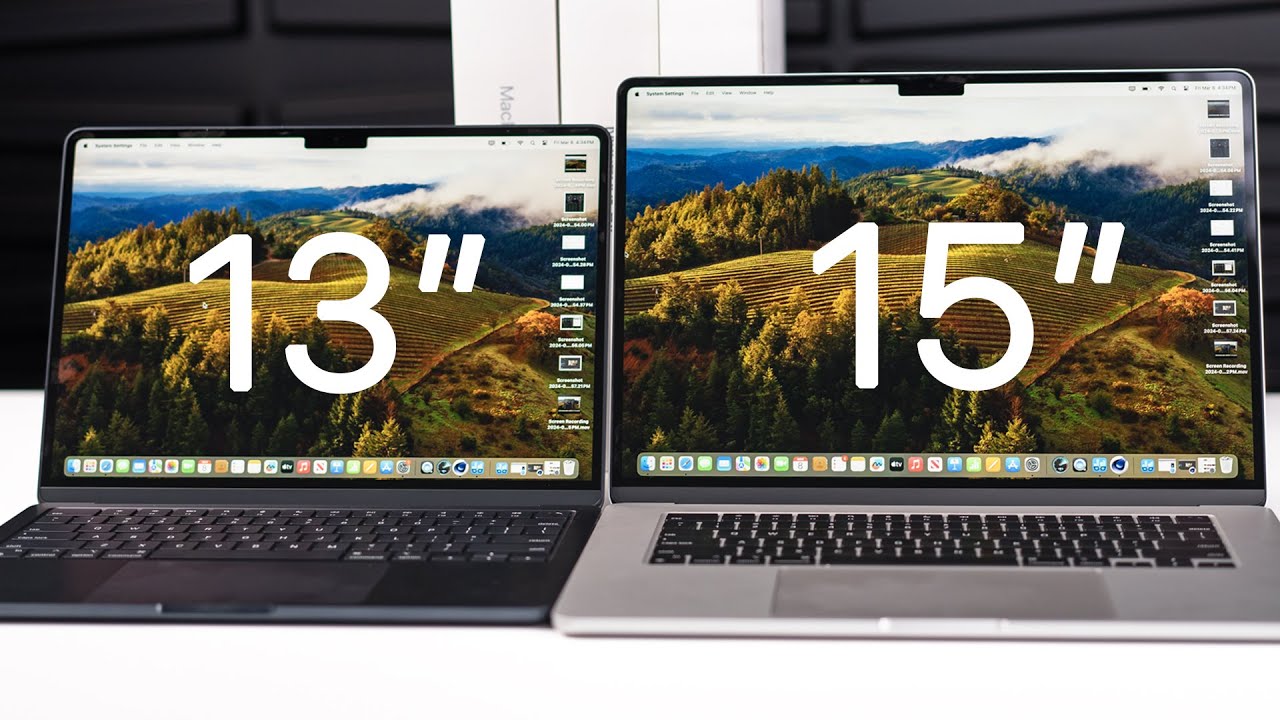
While both laptops share the same 1.13cm thickness and wedge design, the 15-inch model is significantly wider and deeper. This impacts not just how it fits in a bag, but also how it feels on your lap.
Physical Dimensions Side-by-Side
The 15-inch model adds about 4cm in width and 2.8cm in depth compared to the 13-inch.
- Width 30.41 cm (13") vs 34.46 cm (15")
- Depth 21.24 cm (13") vs 24.05 cm (15")
- Screen Area 156 cm² (13") vs 186 cm² (15")
Real-World Weight Feel
The 270g difference is negligible for 5-10 minutes of use. However, commuters carrying the laptop for 1-2 hours report the 15-inch model causes noticeable shoulder fatigue, whereas the 13-inch remains barely perceptible in a backpack.
Display Quality & Screen Real Estate
Same Tech, More Space
Both feature Liquid Retina displays with 500 nits brightness, P3 wide color, and True Tone. The only difference is the physical canvas size.
Multitasking King
The 15" allows for comfortable side-by-side windows (Safari + Notes) or a 3-column layout. On the 13", split-view often feels cramped.
Coding & Creative
Developers see roughly 10 more lines of code on the 15". Video editors get a longer timeline, making it significantly more productive.
Workspace Width Comparison
Performance: Same Power
Because both use the same Apple M3 or M4 chips (with the same core counts in comparable configs), raw performance is virtually identical. The 15-inch chassis has slightly more thermal volume, but it's not enough to boost sustained performance significantly.
Geekbench 6 (M4 Chip)
Battery Life
While Apple rates both at "up to 18 hours", the larger 15-inch screen consumes more power. Real-world usage shows the 13-inch pulls ahead by 1-2 hours in mixed tasks.
Use Case Analysis: Which Fits You?
Students
The 13-inch is the clear winner for campus life. It fits easily on small lecture hall desks (folded arm trays) and is light enough to carry across campus all day.
- Fits in standard backpacks perfectly.
- Better battery life for long library sessions.
- 15" might be too bulky for crowded classrooms.
Business Professionals
If you work mostly in an office or from home, the 15-inch enhances productivity. Splitting Excel and Outlook, or Zoom and Docs, is a much better experience.
- Excel sheets show 24 rows vs 20 rows.
- More immersive for presentations.
- Frequent flyers might prefer the 13" for tray tables.
Creatives & Designers
For Lightroom, Premiere, or Photoshop, screen real estate is critical. The 15-inch allows for larger toolbars and more visible workspace without cluttering the canvas.
- Timeline visibility in video editors.
- P3 color gamut on both is accurate.
Daily Commuters
Standing on a subway or walking to the office, the 270g difference becomes significant over time. The 13-inch is the "grab and go" champion.
- Easier to use in a coffee shop with small tables.
- Less fatigue carrying it in a shoulder bag.
Video Comparison: Hands-On Review
See the difference in size and usability in our detailed video walkthrough.
Pros & Cons Breakdown
13" Advantages
-
✓
Ultra-Portable Lighter and easier to carry all day.
-
✓
Better Battery Life Slightly better endurance in real-world tests.
-
✓
Lower Price Save $300 for the same specs.
-
✓
Desk Friendly Takes up less space on a crowded desk.
15" Advantages
-
✓
Screen Real Estate 19% more screen area for multitasking.
-
✓
Productivity Boost Comfortable split-screen usage.
-
✓
Better Speakers Room for better acoustic chamber (6 speakers vs 4).
-
✓
Future-Proofing Better for long-term creative workflows.
Price Comparison & Value (2025)
| Configuration | 13" Price | 15" Price | Value Verdict |
|---|---|---|---|
| M4 / 8GB / 256GB | $999 | $1,299 | 13" Better Entry |
| M4 / 16GB / 512GB | $1,299 | $1,599 | 15" Best Value |
| M4 / 24GB / 1TB | $1,599 | $1,899 | 15" Best Value |
*Prices estimated based on standard retail pricing. The $300 gap remains consistent across tiers.
Frequently Asked Questions
Does the 15-inch have better performance?
Does the 13-inch have better battery life?
Which size fits in an airline seat?
Which size resells better?
Final Verdict & Recommendations
The choice between the MacBook Air 13 and 15 ultimately comes down to your lifestyle: Mobility vs. Real Estate.
Best for Students
MacBook Air 13"
Unbeatable portability and price for campus life.
Best for Creatives
MacBook Air 15"
Essential screen space for timelines and toolbars.
Best for Travelers
MacBook Air 13"
Fits everywhere, lighter in the bag, great battery.
Still unsure? If you have the budget and the desk space, the 15-inch offers a more premium, desktop-like experience that prevents future screen-envy. If you move around constantly, the 13-inch is the tool that won't slow you down.


_img1.webp)