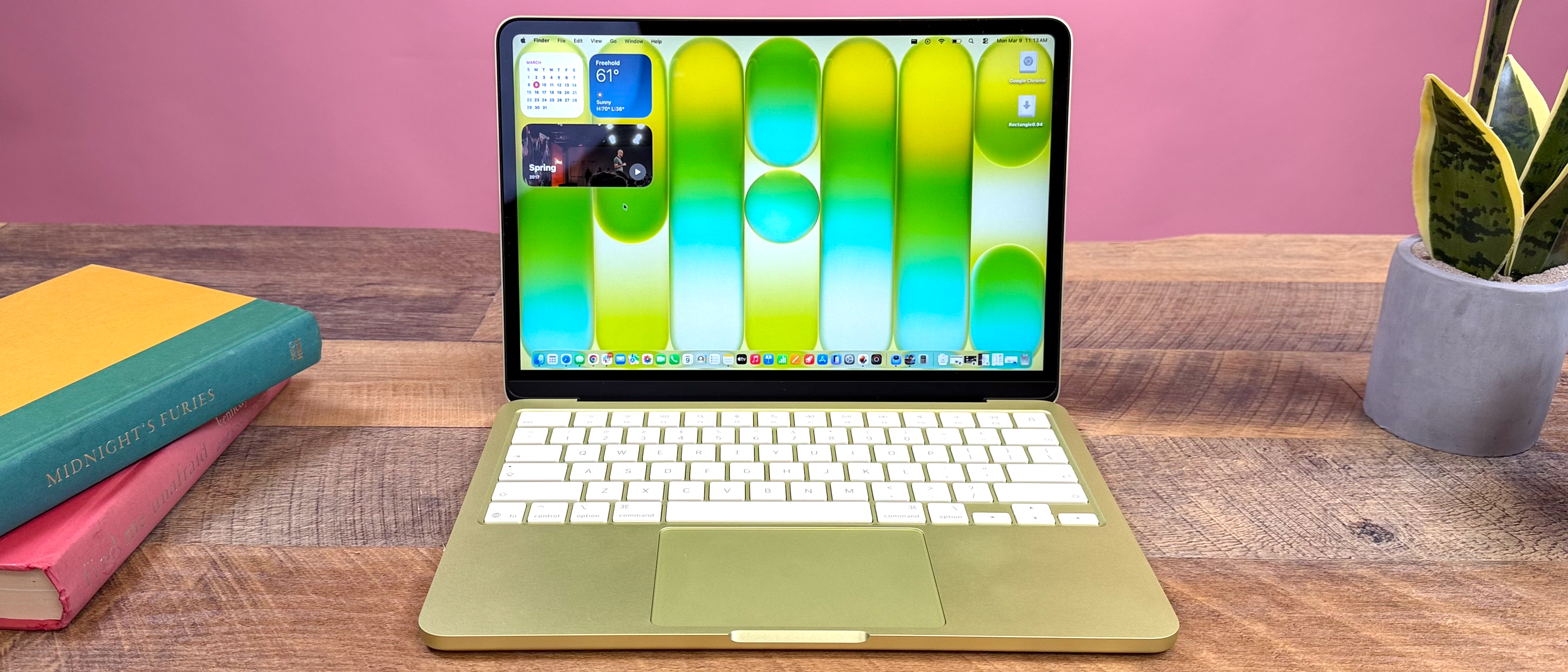
Apple MacBook Neo Specs: Full Specifications Guide
The ultimate 2026 budget-focused MacBook featuring the A18 Pro chip, stunning 13-inch Liquid Retina display, and revolutionary sustainability design.
MacBook Neo Overview: The Future of Affordable Apple Computing
Release Date
Expected Spring 2026. The MacBook Neo represents Apple's next-generation entry into the budget laptop market, focusing on accessibility and eco-friendly design.
Starting Price
$599 for the base 8GB RAM / 256GB SSD model. The 512GB storage variant starts at $699, offering exceptional value in the Apple ecosystem.
Available Colors

Complete MacBook Neo Specifications Table
| Feature | Specification |
|---|---|
| Processor | Apple A18 Pro chip (6‑core CPU, 5‑core GPU, 16-core Neural Engine) |
| GPU | 5-core GPU with hardware-accelerated ray tracing |
| RAM | 8GB unified memory (60GB/s bandwidth) |
| Storage | 256GB or 512GB SSD |
| Display | 13.0-inch Liquid Retina IPS (2408 x 1506, 219 PPI, 500 nits, 1B colors) |
| Battery | 36.5Wh, up to 16h video playback, 20W USB-C adapter |
| Ports | 1x USB 3 Type-C (10Gbps), 1x USB 2.0 Type-C, 3.5mm headphone jack |
| Weight | 2.7 pounds (1.23 kg) |
MacBook Neo Processor and GPU Performance
CPU Architecture & Efficiency
The Apple A18 Pro chip features a 6-core CPU with 2 high-performance cores and 4 high-efficiency cores. This architecture delivers a perfect balance between burst performance for demanding tasks and exceptional battery life for everyday use.
GPU and AI Capabilities
The 5-core GPU includes hardware-accelerated ray tracing for immersive gaming and creative applications. The 16-core Neural Engine accelerates machine learning tasks, making features like Live Captions and advanced image processing incredibly responsive.
A18 Pro Chip Highlights
- ✓ 6-core CPU (2P + 4E) for intelligent performance management
- ✓ 5-core GPU with ray tracing acceleration
- ✓ 16-core Neural Engine (17 TOPS)
- ✓ Media Engine with AV1, ProRes, H.264/HEVC decode/encode
MacBook Neo RAM and Storage Configuration Guide
Base RAM Configuration
The MacBook Neo comes standard with 8GB of unified memory. This isn't traditional RAM—it's a single pool of high-bandwidth, low-latency memory shared between the CPU, GPU, and Neural Engine.
For most users—including students, office workers, and casual creatives—8GB provides smooth multitasking across Safari, Mail, Office apps, and light photo editing.
Storage Options
Choose between 256GB or 512GB of ultra-fast SSD storage. Both options use Apple's latest NAND technology for remarkable read/write speeds.
Which Configuration Is Best?
For most buyers: The 256GB model is sufficient, especially with cloud storage and external drives.
Upgrade to 512GB if you: Work with large local files, install many apps/games, or want longer-term storage headroom. The 512GB model also includes Touch ID on the keyboard.
Recommendation: Students and light users should choose 256GB. Professionals and content creators should opt for 512GB.
MacBook Neo Display Specifications and Visual Experience

Screen Size & Resolution
The 13.0-inch Liquid Retina display features a 2408 x 1506 native resolution at 219 pixels per inch. This Retina-quality screen makes text razor-sharp and images incredibly detailed—perfect for long reading sessions and precision work.
Brightness & Color Accuracy
With 500 nits of brightness, the screen remains readable even in bright indoor environments. It supports 1 billion colors and covers the sRGB color gamut, making it suitable for photo editing and design work where color consistency matters.
Display Technology Breakdown
The IPS technology ensures wide viewing angles with minimal color shift—great for sharing your screen with others.
MacBook Neo Battery Life and Charging Capabilities
Battery Capacity & Real-World Life
The 36.5-watt-hour lithium‑ion battery delivers exceptional efficiency thanks to the A18 Pro chip's optimized architecture. Apple estimates up to 16 hours of video playback and 11 hours of wireless web browsing on a single charge.
In practical terms, this translates to a full day of mixed use—productivity apps, web browsing, media consumption, and light creative work—without needing to reach for the charger.
Charging Speed & Convenience
The included 20W USB-C Power Adapter can charge the MacBook Neo from 0% to 50% in approximately 30 minutes. Both USB-C ports support charging, giving you flexibility in how you power your device.
MacBook Neo Ports, Connectivity and Expansion Options
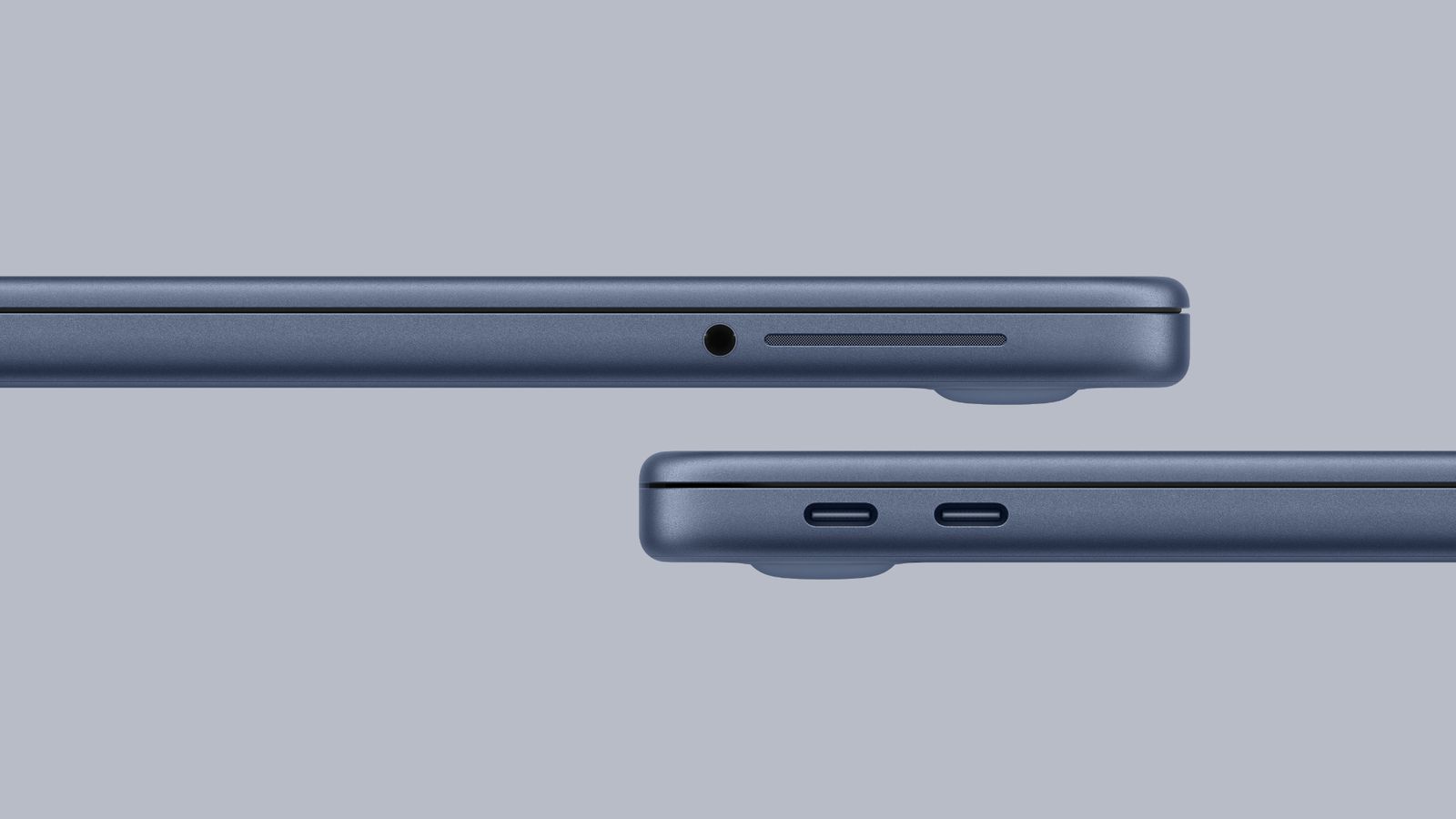
USB Ports & Data Transfer
USB 3 Type-C (10Gbps): Perfect for fast external storage, displays, and docking stations.
USB 2.0 Type-C (480Mbps): Suitable for charging, slower peripherals, or connecting to older accessories.
Both ports support charging, but for fastest data transfer, use the USB 3 port.
Wireless Connectivity
Wi-Fi 6E (802.11ax): Enjoy faster speeds, lower latency, and better performance in congested areas with support for the 6GHz band.
Bluetooth 6: Connect wireless headphones, keyboards, and mice with improved range, speed, and power efficiency.
External Display Support
The MacBook Neo supports one external display up to 4K at 60Hz via the USB 3 port, while simultaneously driving the built-in display at full resolution.
Perfect for extending your workspace with a monitor at home or office. The USB 3 port supports native DisplayPort 1.4.
MacBook Neo Dimensions, Weight and Sustainable Design
Dimensions & Portability
At just 0.50 inch (1.27 cm) thin and weighing only 2.7 pounds (1.23 kg), the MacBook Neo is designed for maximum portability. Its compact footprint (11.71 x 8.12 inches) fits easily in backpacks, briefcases, and small bags.
Materials & Sustainability
The MacBook Neo represents Apple's commitment to the environment with 60% recycled content across its construction:
- ♻ 90% recycled aluminum enclosure
- ♻ 100% recycled cobalt and 95% recycled lithium in battery
- ♻ 100% recycled rare earth elements in all magnets
The packaging is 100% fiber-based, and Apple's final assembly sites send zero waste to landfill.
MacBook Neo Performance Expectations for Different Users
Everyday Productivity
For students and office workers, the MacBook Neo handles dozens of Safari tabs, Microsoft Office/Google Workspace apps, video calls, and media streaming with ease. The 8GB unified memory efficiently manages these tasks without slowdowns.
Perfect for: Email, documents, spreadsheets, web browsing, video conferencing
Programming & Development
The A18 Pro's performance cores compile code quickly, while the efficiency cores keep the system responsive during testing. Xcode, VS Code, Docker containers, and local servers run smoothly on the 8GB/256GB+ configuration.
Ideal for: Web development, Python scripting, app development, learning to code
Creative Work
With hardware-accelerated ProRes and the 5-core GPU, the MacBook Neo handles 1080p video editing in iMovie/Final Cut Pro, photo editing in Lightroom/Photoshop, and graphic design in Figma/Sketch surprisingly well for its price point.
Great for: Photo editing, 1080p video projects, UI/UX design, music production
Best MacBook Neo Configuration Recommendations
Best for Students
$599The base 8GB/256GB model provides everything a student needs: portability for campus life, all-day battery for library sessions, and enough performance for research, writing, and presentations.
- ✓ Lightweight (2.7 lbs) for all-day carrying
- ✓ 16-hour battery lasts through back-to-back classes
- ✓ Enough storage for textbooks, notes, and projects
Pair with Apple Education pricing for additional savings.
Best for Professionals
$699The 8GB/512GB configuration with Touch ID offers the ideal balance for professionals: extra storage for client files, Touch ID for security/convenience, and the same excellent performance in meetings and on the go.
- ✓ 512GB SSD for local file storage and applications
- ✓ Touch ID for secure login and Apple Pay
- ✓ Professional-grade build quality and display
Consider AppleCare+ for added protection during travel.
MacBook Neo Pros and Cons: Balanced Assessment
Advantages
-
✓
Exceptional Value: Apple quality starting at $599 with premium features like the A18 Pro chip and Liquid Retina display.
-
✓
Outstanding Battery Life: All-day 16-hour battery makes it perfect for students and travelers.
-
✓
Eco-Friendly Design: 60% recycled materials align with sustainable computing values.
-
✓
Lightweight & Portable: At 2.7 lbs, it's one of the lightest MacBooks ever made.
Limitations
-
!
Limited Port Selection: Only two USB-C ports may require dongles for some workflows.
-
!
Non-Upgradeable RAM/Storage: Choose your configuration carefully at purchase.
-
!
Single External Display: Supports only one external monitor, which may limit some professional setups.
-
!
Base Model Lacks Touch ID: The $599 model uses a traditional power button without fingerprint sensor.
Final Verdict: Is the MacBook Neo Right For You?
Who Should Buy the MacBook Neo?
The MacBook Neo represents a compelling entry point into the Apple ecosystem without significant compromises. Its A18 Pro chip delivers performance that rivals more expensive laptops, while its sustainable design and all-day battery make it a responsible choice for the environmentally conscious.
For students, first-time Mac buyers, budget-conscious professionals, and secondary device users, the MacBook Neo offers remarkable value. It handles 95% of everyday computing tasks with ease while providing the premium build quality and software experience Apple is known for.
Bottom Line: If you need a portable, efficient, eco-friendly laptop for under $700 that runs macOS beautifully, the MacBook Neo is an outstanding choice. Consider the 512GB upgrade if your budget allows—the extra storage and Touch ID are worth the $100 premium for most users.
MacBook Neo Specs: Frequently Asked Questions
What processor does the MacBook Neo use and how powerful is it?
The MacBook Neo uses Apple's A18 Pro chip with a 6-core CPU (2 performance + 4 efficiency cores), 5-core GPU, and 16-core Neural Engine. It delivers performance comparable to Intel Core i7 and AMD Ryzen 7 processors in its class, with exceptional power efficiency for all-day battery life.
How much RAM does the MacBook Neo have and is it enough?
All configurations come with 8GB of unified memory. Thanks to macOS optimization and the efficient memory architecture of Apple Silicon, 8GB performs similarly to 12-16GB on some Windows laptops. It's sufficient for most users including students, office workers, and light creatives.
What processor does the MacBook Neo use and how powerful is it?
The MacBook Neo uses Apple's A18 Pro chip with a 6-core CPU (2 performance + 4 efficiency cores), 5-core GPU, and 16-core Neural Engine. It delivers performance comparable to Intel Core i7 and AMD Ryzen 7 processors in its class, with exceptional power efficiency for all-day battery life.
How much RAM does the MacBook Neo have and is it enough?
All configurations come with 8GB of unified memory. Thanks to macOS optimization and the efficient memory architecture of Apple Silicon, 8GB performs similarly to 12-16GB on some Windows laptops. It's sufficient for most users including students, office workers, and light creatives.
Does MacBook Neo support external monitors?
Yes, MacBook Neo supports one external display with up to 6K resolution at 60Hz via USB-C. This is perfect for connecting to modern 4K and 6K displays. However, it cannot drive multiple external monitors like some higher-end MacBook Pro models.
Can I upgrade the RAM or storage later?
No. Both the 8GB unified memory and storage (256GB or 512GB SSD) are soldered to the motherboard and cannot be upgraded after purchase. Choose your configuration carefully based on your anticipated needs over the laptop's lifetime.
Is MacBook Neo good for gaming?
MacBook Neo can handle casual gaming, indie titles, and older games through Apple Arcade and Mac App Store. However, it's not designed for AAA gaming. The A18 Pro's 5-core GPU provides decent performance for light gaming but lacks the power for demanding modern titles.
Does MacBook Neo have a touchscreen?
No, MacBook Neo does not have a touchscreen display. Apple has maintained that macOS is optimized for keyboard, trackpad, and mouse input rather than touch. However, it integrates seamlessly with iPhone and iPad for tasks that benefit from touch interaction.
How long does the battery really last?
Apple rates MacBook Neo for up to 16 hours of video playback or 13 hours of wireless web browsing. In real-world mixed usage (web browsing, document editing, video streaming), you can expect 12-15 hours depending on screen brightness and workload.
Is education pricing available for MacBook Neo?
Yes! Apple offers education pricing for students, parents buying for students, and educators. The MacBook Neo education price is $499, saving you $100 off the regular $599 price. Verification is required through UNiDAYS or institutional email.
What's included in the box?
MacBook Neo comes with: the laptop itself, a 35W Dual USB-C Port Compact Power Adapter, and a USB-C to MagSafe 3 Cable (2 meters). Note: Despite including a MagSafe cable, the Neo lacks MagSafe charging capability - the cable is for USB-C charging only.
Can MacBook Neo run Windows applications?
Not natively. The A18 Pro chip uses ARM architecture, making Boot Camp unavailable. However, you can run Windows applications through virtualization software like Parallels Desktop (paid) or use web-based alternatives and cross-platform apps.
How does MacBook Neo compare to iPad Air with keyboard?
MacBook Neo offers full macOS capabilities, traditional laptop form factor, better multitasking, and more ports. iPad Air provides touchscreen, Apple Pencil support, and greater portability. For productivity and versatility as a primary computer, MacBook Neo is the better choice.
Is MacBook Neo worth it compared to used MacBooks?
Absolutely. MacBook Neo offers brand-new condition, full warranty, latest A18 Pro chip, modern design, and long-term software support. Used MacBooks may seem cheaper initially but could lack warranty, have battery wear, and receive fewer macOS updates.
Quick Specs Reference
Processor
A18 Pro (6-core CPU, 5-core GPU)
Memory
8GB unified memory
Storage
256GB / 512GB SSD
Display
13.6" Liquid Retina (2560×1664)
Battery
Up to 16 hours video playback
Weight
2.42 lbs (1.1 kg)
Ports
2× USB-C, 3.5mm headphone jack
Webcam
720p FaceTime HD camera
Starting Price
$599 ($499 education)



_img1.webp)