MacBook Neo: Redefining Value
The $599 budget-focused laptop that challenges conventions by integrating iPhone technology into the Mac ecosystem.

What Makes the MacBook Neo Different? Key Features & Compromises
Revolutionary A18 Pro Chip
Powered by the same iPhone 16 Pro's A18 Pro chip, this marks a significant departure from Apple's M-series silicon, offering exceptional energy efficiency for everyday tasks.
Mechanical Trackpad Experience
Features a traditional mechanical "clicky" trackpad with more physical travel, differing from the haptic Force Touch technology in premium MacBooks.
No Keyboard Backlight
A rare compromise in modern laptops: the keyboard lacks backlighting, making it challenging to type in low-light environments.
Notch-Free Display Design
Features a clean 13-inch screen without the notch, utilizing thicker bezels to house a 1080p webcam while maintaining a traditional look.
Fixed 8GB RAM Configuration
Comes with 8GB of non-upgradable RAM, sufficient for daily tasks but noticeably underpowered compared to M5 series MacBooks for intensive workloads.
Single External Display Support
Limited to one external display at 4K resolution and 60Hz, restricting multi-monitor setups for productivity users.
MacBook Neo Design: Portability and Sustainable Construction
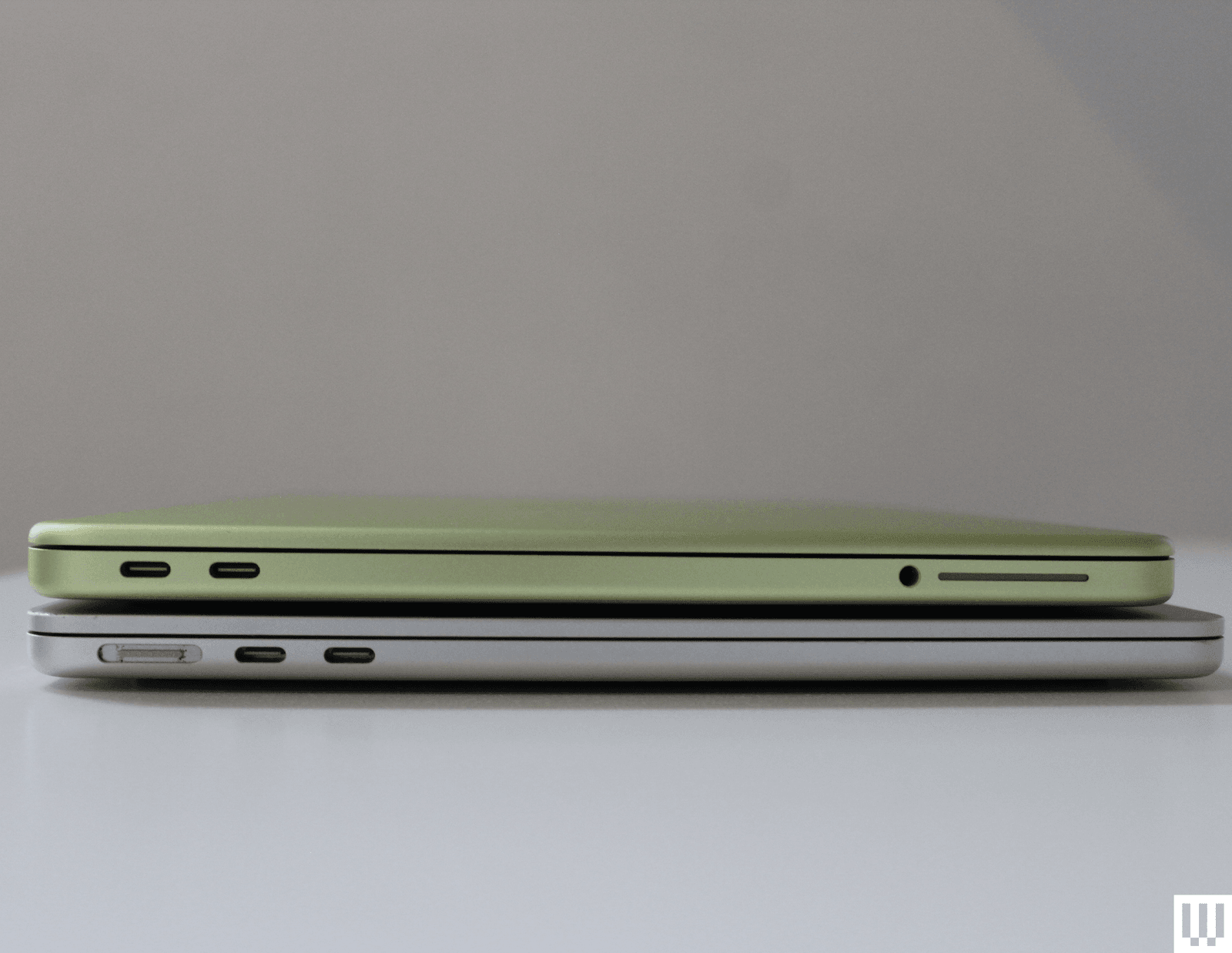
Compact and Eco-Friendly Build
- ✓ Smaller footprint than the M1 MacBook Air with a weight of just 2.7 pounds (1.22 kg)
- ✓ Durable recycled aluminum construction that maintains Apple's premium feel
- ✓ Optimized thermal design that leverages the A18 Pro's efficiency for fanless operation
- ✓ All-day battery life exceeding 14 hours for web browsing and productivity tasks
"The MacBook Neo's design proves that sustainable materials and compact form factors don't require sacrificing durability."
MacBook Neo Performance: A18 Pro Chip vs Traditional Mac Silicon
Real-World Usage Scenarios
The A18 Pro chip in MacBook Neo represents Apple's first cross-platform silicon experiment, bringing iPhone-grade efficiency to macOS. While it excels at everyday tasks like web browsing, document editing, and media consumption, it shows limitations in professional applications.
Strengths:
- Exceptional single-core performance for responsive daily use
- Industry-leading power efficiency for extended battery life
- Seamless integration with iOS apps via the App Store
- Cool and quiet fanless operation
Limitations:
- 8GB RAM constraint for multitasking with memory-intensive apps
- Limited to one external display connection
- Not optimized for professional video editing or 3D rendering
- Slower SSD speeds compared to MacBook Air models
Performance Comparison
Based on performance testing from Macworld and WIRED reviews
MacBook Neo Market Position: The New Entry-Level Mac
Positioned below the MacBook Air in Apple's lineup, the MacBook Neo serves as an accessible gateway into the macOS ecosystem. It's designed for students, first-time Mac users, and those who prioritize value over peak performance.
"The MacBook Neo delivers a comfortable, capable experience for standard users who don't need professional-grade performance but want the Apple ecosystem at an unprecedented price point."
MacBook Neo Hands-On Review
Video placeholder: MacBook Neo detailed review and comparison
MacBook Neo Verdict: Who Should Consider This Different Approach?
The MacBook Neo isn't for everyone, but it represents an important shift in Apple's strategy
Ideal For:
- ✓ Budget-conscious students needing a reliable laptop for coursework
- ✓ First-time Mac users wanting to try macOS without significant investment
- ✓ Secondary device users who need a portable companion to their primary computer
- ✓ Light users whose computing needs are limited to web, email, and streaming
Not Recommended For:
- ✗ Creative professionals working with video, 3D, or large photo libraries
- ✗ Power users who regularly multitask with memory-intensive applications
- ✗ Multi-monitor users who require extended desktop setups
- ✗ Those who frequently work in low-light environments without keyboard backlighting



_img1.webp)